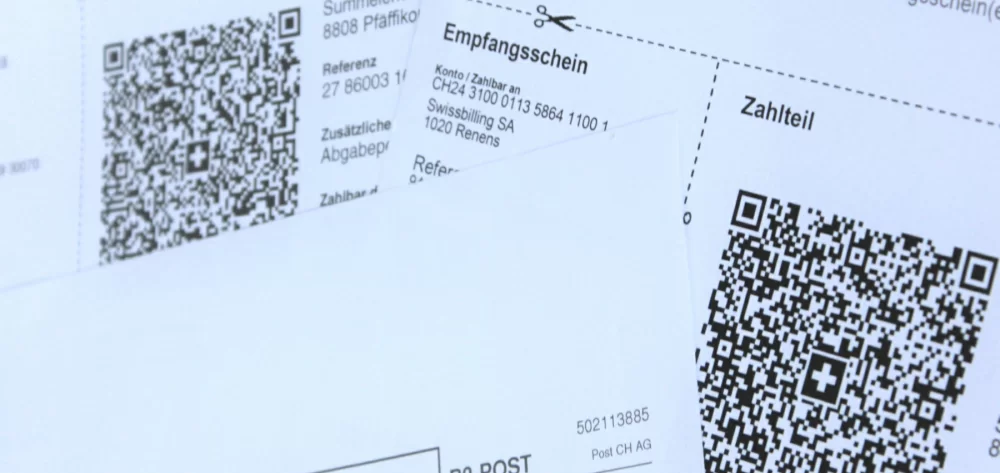
The QR-bill is the successor to the deposit slip. With the QR-bill, you can pay bills via e-banking, mobile banking, with a paper payment order, or at the post office counter. In addition to the basic bill, the QR-bill also includes a deposit section and a receipt. The deposit section and receipt – the two components of the previous deposit slips – can also be provided separately from the bill.
The QR-bill contains the Swiss QR Code with the visible Swiss cross in the middle. The QR code includes all of the same information which is shown on the deposit section. This means information can either be read directly from the deposit section or scanned from the QR code using a QR-code scanning device. The QR-bill can be printed on standard paper using a normal printer – in black and white if desired.
The QR-bill comes in three versions: one without a QR reference, one with a QR reference and one with a creditor reference.
What is a QR-bill without a QR reference?
With the QR-bill without QR reference, you can transfer money to any Swiss bank account.
What is a QR-bill with a QR reference?
With QR-bills with QR references, companies can automatically register bills thanks to the reference number. This means they are also suitable for businesses which send out large numbers of bills. Unlike QR-bills without a QR reference, no individual messages can be attached.
This option uses a special IBAN number that only works for payments made using QR-bills.
What is a QR-bill with a creditor reference?
The QR-bill with a creditor reference includes the structured creditor reference (SCOR) which enables the exact allocation of payments. Each transaction has an individual, one-time identification number. The QR-bill with a creditor reference is based on the international ISO 11649 standard.
The QR-bill can only be used in Switzerland and Liechtenstein. However, the IBAN and the creditor reference can be used to receive transfers from outside of Switzerland in when combined with the Swift code of the recipient bank.
This form of QR-bill has advantages for companies that do business internationally. It lets businesses uses a unified billing system for both local and international payments.
How do I scan the QR code?
Many banks include QR-bill scanning in their mobile banking apps which enable QR code scanning with smartphones. The information scanned from the QR code is automatically transferred to online banking.
Some banks also offer QR code scanners – such as the PayEye devices. These devices let you transfer data directly from QR-bills into your book keeping or e-banking software.
Can I enter billing information manually?
Yes. If you prefer not to scan the QR code due to privacy concerns or other reasons, you can manually enter the billing information shown in the deposit section to make payments using online banking.
Can I use the QR code without the full bill?
Yes. The QR code can be printed on its own, without an accompanying bill. This means that a QR code can be included on a billboard, ad or brochure and used to make donations to a charity, for example. The QR code can be read with online banking software and a mobile phone, scanning all information directly into the mobile banking app where you can use it to transfer money.
Can I still pay my bills at the post office?
You can still pay bills at the post office using QR-bills. The post office does not charge you as the depositor when you pay bills. However, the recipient of the money has to pay fees to the post office, and these are relatively high in relation to the amount deposited. For example, the merchant which issued the bill must pay 1.20 francs per deposit under 50 francs, and 2.35 francs per deposit between 100 and 1000 francs.
Postfinance confirmed to moneyland.ch that deposits can still be made without QR bills. Post office customers can still make transactions at the counter without QR bills, but they need to provide all of the relevant data required. Postal service employees are required to ask customers to please ask creditors to send them printed QR-bills in the future.
How can I create my own QR-bills?
All current bookkeeping software is capable of creating QR-bills. Many banks and third-party providers offers its customers a QR-bill generator with which they can create QR-bills that can be printed or shared in PDF format.
How do banks recognize QR-bills with QR references?
Bank customers which issue QR-bills with QR references receive a special IBAN from their banks. This is known as a QR-IBAN, and can only be used for QR-bills with QR references. The money deposited into the special account which corresponds to the QR-IBAN is credited to the customer’s regular account.
If the fifth and sixth digits in an IBAN are 30 or 31, that IBAN is a QR-IBAN.
Deposit slip
Deposit slips were used in Switzerland between 1906 and 2022. Most recently, orange and red deposit slips were in use, while earlier versions had been green and blue. Since October 2022, the old payment slips can no longer be used.
More on this topic:
Compare Swiss bank accounts now



 Deal of the Day